


Chase Sapphire Preferred Hyatt Transfer Nerf: What the 4:3 Ratio Means for Your Points
NCnextcard team
Advertiser Disclosure: nextcard may receive compensation from card issuers. Opinions expressed here are the author's alone, not those of any bank, credit card issuer, airlines or hotel chain. For the most up-to-date terms & conditions, refer to the official credit card application on the issuer's website.
The $300 dining credit is a useful benefit on the Chase Sapphire Reserve® but there’s an underrated benefit where you also get access to exclusive reservation times for restaurants on the Sapphire Reserve Exclusive Tables program.
However, the Sapphire Reservation slots always seems to trip people up, especially when it comes to how you can use your dining credit.
Also, if you’ve been thinking about getting the card, it has an awesome bonus offer for new cardmembers: Earn 100,000 bonus points after you spend $6,000 on purchases in the first 3 months from account opening.
You do not need a reservation to use the $300 dining credit on the Chase Sapphire Reserve®. Just dine and pay with your Reserve at an eligible Sapphire Reserve Exclusive Tables restaurant to use the credit
The $300 credit is split into two semiannual $150 chunks: one for January through June, another for July through December. You can spread it across multiple meals.
To book exclusive reservation times only available to Sapphire Reserve cardholders, add your card on OpenTable and search by city. This isn’t a requirement to use the credit
Exclusive reservations are mostly available in major US cities, so check the nextcard CSR dining credit map to find eligible restaurants near you.
Just to be clear, you do not need a reservation to use the $300 credit.
As long as you dine at one of the restaurants on the Sapphire Reserve Exclusive Tables program, you’ll trigger the dining credit. You get $150 in credit for January through June and then another $150 for July through December. You don’t have to use it all in one go; you can use it at multiple Sapphire Reserve Exclusive Tables restaurants for up to $150 in credit biannually.
In fact, looking at the terms & conditions, here's what they say:
A statement credit will be automatically applied to your account for dining purchases at select restaurants up to a maximum accumulation of $150 in statement credits from January 1 through June 30 and up to $150 from July 1 through December 31, for a total maximum accumulation of $300 in statement credits each calendar year. Calendar year means January 1 through December 31 of that same year
Nothing here says you need a reservation to use the credit.
$300 Dining Credit | Exclusive Reservation Slots | |
|---|---|---|
What it is | Up to $300 in annual statement credits ($150 per half-year) when you dine at Sapphire Reserve Exclusive Tables restaurants | Reservation times at participating restaurants that are only available to Sapphire Reserve cardholders |
Reservation needed? | No. Just dine and pay with your Sapphire Reserve card | Yes. Book through OpenTable. You'll need to link your Reserve to see these slots |
How it works | Credits post automatically after you pay at an eligible restaurant | Exclusive time slots appear in blue on OpenTable after you add your card |
Availability | All Sapphire Reserve Exclusive Tables restaurants nationwide | Mostly major US cities |
You can view all the eligible CSR Dining Credit restaurants here.
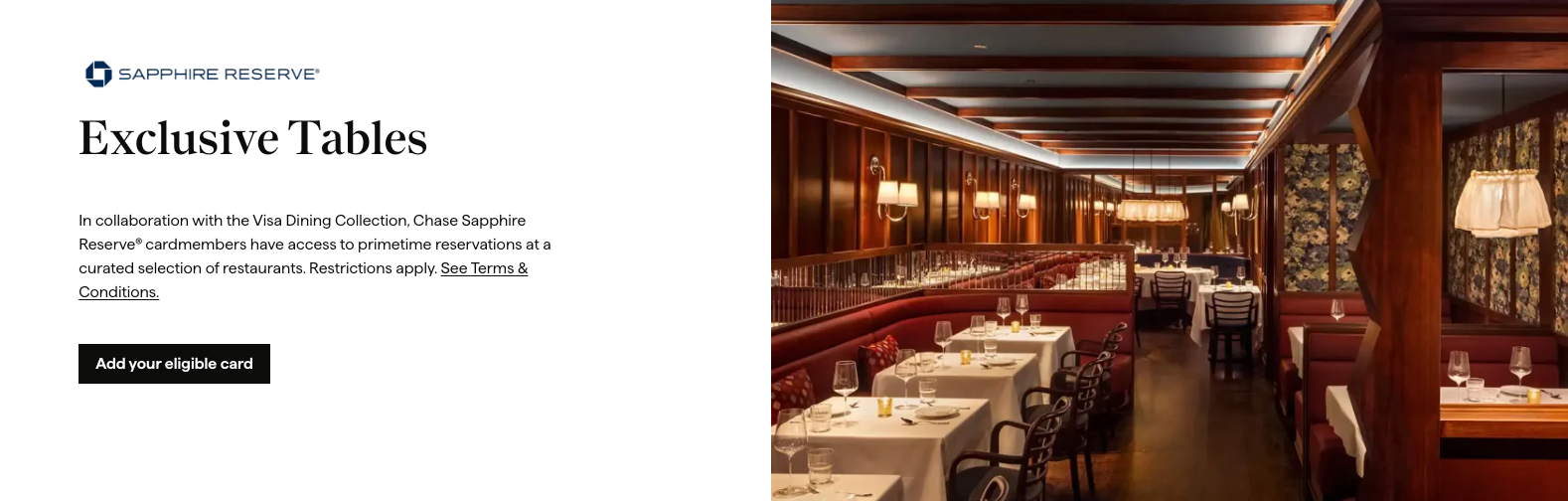
In order to book a reservation that’s exclusive to Chase Sapphire Reserve® cardholders, you’ll need to first go onto OpenTable to add your card.
After you add your Chase Sapphire Reserve®, you will then select the area you want to search. Just a reminder that restaurants on the Sapphire Reserve Exclusive Tables program are mostly available in cities across the US (generally not in rural and suburban areas).
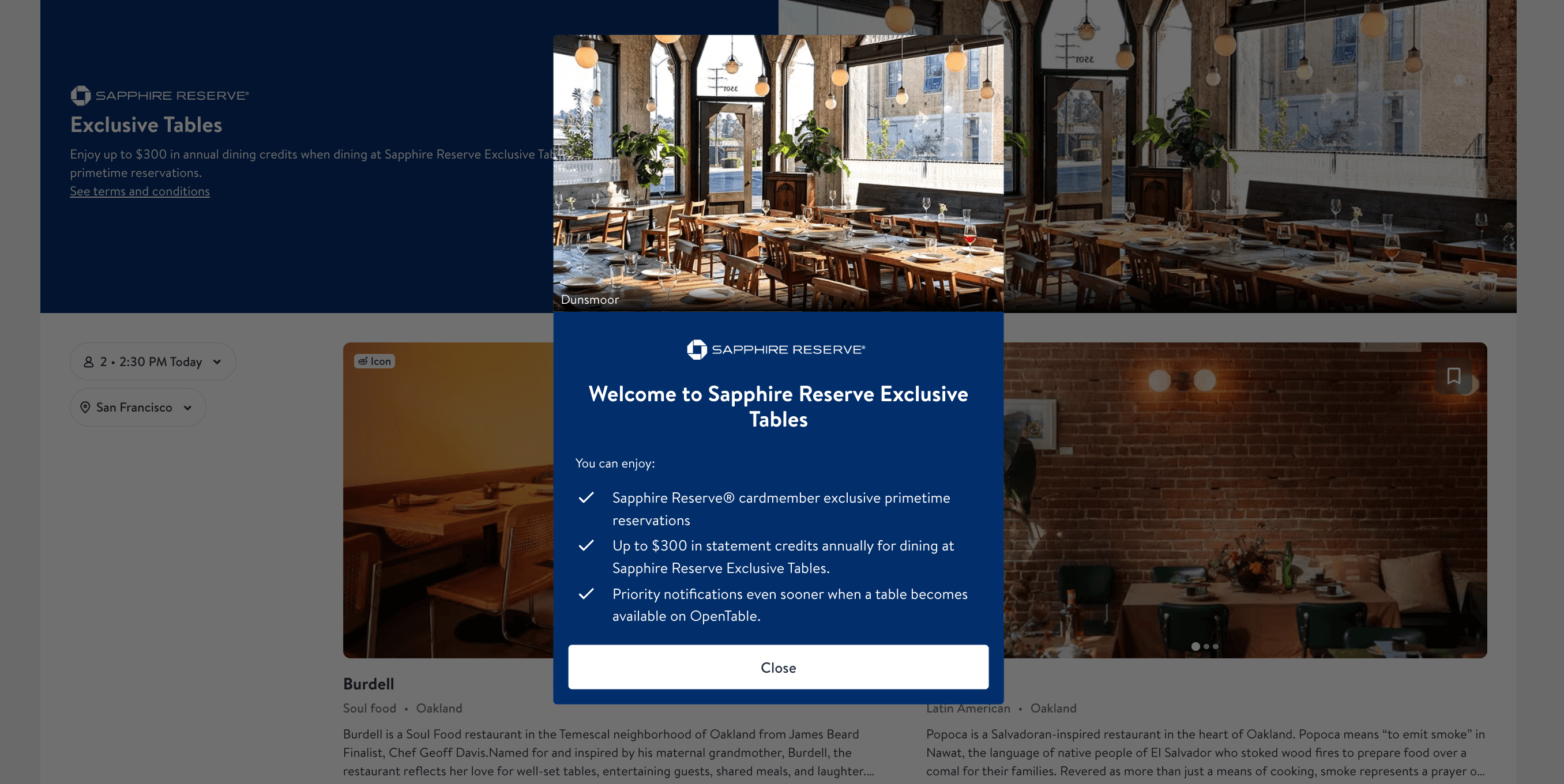
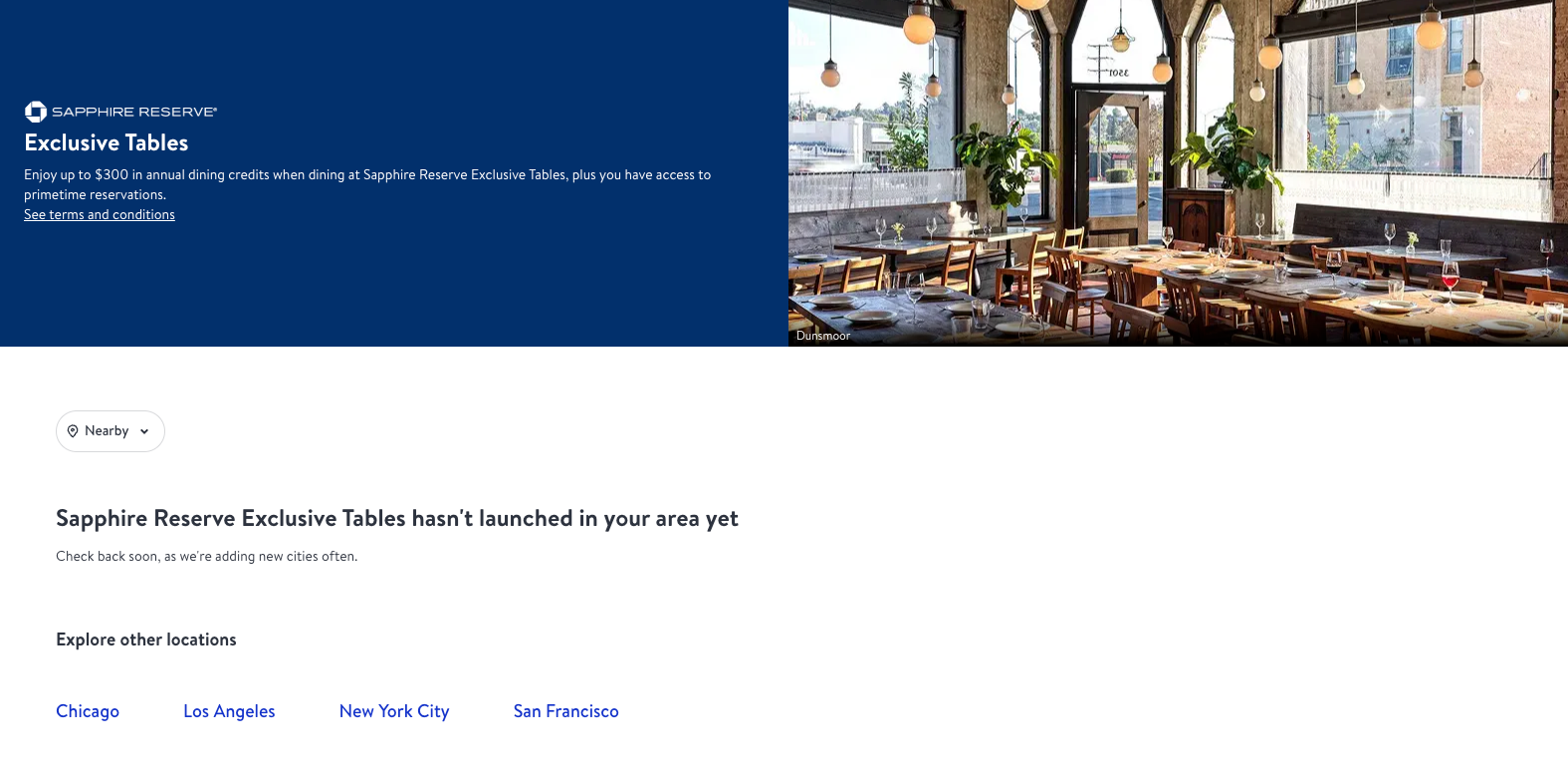
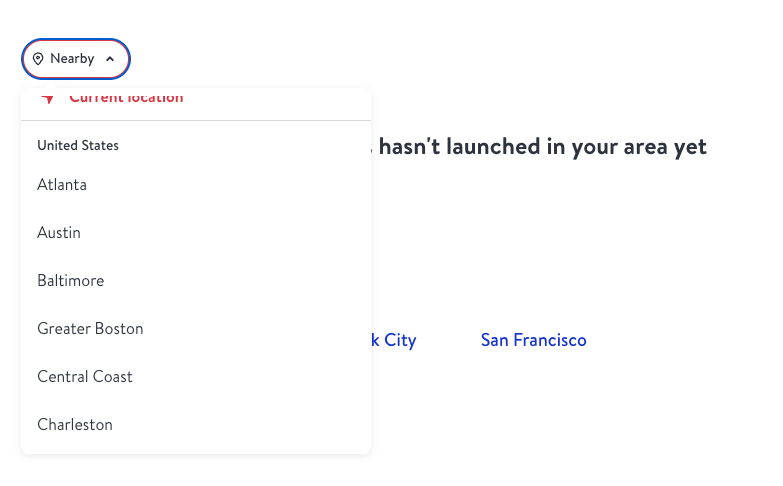
If you use your “nearby” area and see no restaurants, it could be because you don’t live near a city where this program is available. In order to search an area you will click on that button that says “nearby” and it will show you a list of cities to choose from where there are Sapphire Reserve Exclusive Tables restaurants.
I chose Greater Boston for the area and Grill 23 & Bar as an example. For a party of two on August 25, 2026, OpenTable showed four times in blue labeled “Sapphire” (7:30 p.m., 7:45 p.m., 8:00 p.m., and 8:15 p.m) that were only available to Sapphire Reserve cardholders. The 8:30 p.m. time appeared without the Sapphire label as a standard reservation slot. Availability changes by date and party size, so the exact times you see may differ.

If you don't want to struggle through the OpenTable platform to find eligible restaurants, you can also use the nextcard CSR dining credit map tool!
Scrolling through OpenTable city by city can be tedious, especially if you're traveling and want to plan ahead. Instead of manually searching each area, you can use the nextcard CSR dining credit map to see every eligible Sapphire Reserve Exclusive Table restaurant on a single, searchable map.
Here's how to use it:
Head to the CSR dining credit map and search by city or zip code
Filter by cuisine type or price range to narrow down your options
Check which restaurants also participate in other dining rewards programs (like Bilt Neighborhood Dining or Resy) so you can stack benefits at a single meal
The map pulls in all ~400 Sapphire Reserve Exclusive Table locations nationwide, so you can plan whether you're dining at home or on the road. It's especially handy for checking coverage before a trip so you know exactly where your $300 dining credit works.
The $300 dining credit is by far one of the best benefits on the Chase Sapphire Reserve® and there’s an additional little perk where you get exclusive access to reservations. These exclusive reservation times at restaurants with the Sapphire Reserve Exclusive Tables program can help you to book your next date night with your significant other or a big dinner with friends. Let us know if these exclusive reservations help you out at your next dining experience:)
No. You can just dine at a restaurant listed on the Sapphire Reserve Exclusive Tables program and you’ll receive the credit.
Yes! You don't have to blow through it in one meal. You can spread your credit across multiple visits to different Sapphire Reserve Exclusive Tables restaurants, as long as the total stays within your $150 semiannual cap.
Exclusive reservation times are mostly available in major US cities like New York, Boston, Los Angeles, San Francisco, Chicago, and Miami. If you're in a rural or suburban area, you likely won't see any exclusive slots on OpenTable.
No. The exclusive reservation times are a free perk of being a cardholder. You just need to add your card on OpenTable to see and book them.
On OpenTable, exclusive time slots appear in blue with a “Sapphire” label after you link an eligible card. Standard reservation times appear without the Sapphire label.
Yes. Chase says you must pay with your Sapphire Reserve at a participating Sapphire Reserve Exclusive Tables restaurant in order to receive the credit. Linking the card to OpenTable unlocks access to exclusive reservation times, but it does not replace using the card to pay for the eligible meal.
Advertiser Disclosure: nextcard may receive compensation from card issuers. Opinions expressed here are the author's alone, not those of any bank, credit card issuer, airlines or hotel chain. For the most up-to-date terms & conditions, refer to the official credit card application on the issuer's website.
The $300 dining credit is a useful benefit on the Chase Sapphire Reserve® but there’s an underrated benefit where you also get access to exclusive reservation times for restaurants on the Sapphire Reserve Exclusive Tables program.
However, the Sapphire Reservation slots always seems to trip people up, especially when it comes to how you can use your dining credit.
Also, if you’ve been thinking about getting the card, it has an awesome bonus offer for new cardmembers: Earn 100,000 bonus points after you spend $6,000 on purchases in the first 3 months from account opening.
You do not need a reservation to use the $300 dining credit on the Chase Sapphire Reserve®. Just dine and pay with your Reserve at an eligible Sapphire Reserve Exclusive Tables restaurant to use the credit
The $300 credit is split into two semiannual $150 chunks: one for January through June, another for July through December. You can spread it across multiple meals.
To book exclusive reservation times only available to Sapphire Reserve cardholders, add your card on OpenTable and search by city. This isn’t a requirement to use the credit
Exclusive reservations are mostly available in major US cities, so check the nextcard CSR dining credit map to find eligible restaurants near you.
Just to be clear, you do not need a reservation to use the $300 credit.
As long as you dine at one of the restaurants on the Sapphire Reserve Exclusive Tables program, you’ll trigger the dining credit. You get $150 in credit for January through June and then another $150 for July through December. You don’t have to use it all in one go; you can use it at multiple Sapphire Reserve Exclusive Tables restaurants for up to $150 in credit biannually.
In fact, looking at the terms & conditions, here's what they say:
A statement credit will be automatically applied to your account for dining purchases at select restaurants up to a maximum accumulation of $150 in statement credits from January 1 through June 30 and up to $150 from July 1 through December 31, for a total maximum accumulation of $300 in statement credits each calendar year. Calendar year means January 1 through December 31 of that same year
Nothing here says you need a reservation to use the credit.
$300 Dining Credit | Exclusive Reservation Slots | |
|---|---|---|
What it is | Up to $300 in annual statement credits ($150 per half-year) when you dine at Sapphire Reserve Exclusive Tables restaurants | Reservation times at participating restaurants that are only available to Sapphire Reserve cardholders |
Reservation needed? | No. Just dine and pay with your Sapphire Reserve card | Yes. Book through OpenTable. You'll need to link your Reserve to see these slots |
How it works | Credits post automatically after you pay at an eligible restaurant | Exclusive time slots appear in blue on OpenTable after you add your card |
Availability | All Sapphire Reserve Exclusive Tables restaurants nationwide | Mostly major US cities |
You can view all the eligible CSR Dining Credit restaurants here.
In order to book a reservation that’s exclusive to Chase Sapphire Reserve® cardholders, you’ll need to first go onto OpenTable to add your card.
After you add your Chase Sapphire Reserve®, you will then select the area you want to search. Just a reminder that restaurants on the Sapphire Reserve Exclusive Tables program are mostly available in cities across the US (generally not in rural and suburban areas).
If you use your “nearby” area and see no restaurants, it could be because you don’t live near a city where this program is available. In order to search an area you will click on that button that says “nearby” and it will show you a list of cities to choose from where there are Sapphire Reserve Exclusive Tables restaurants.
I chose Greater Boston for the area and Grill 23 & Bar as an example. For a party of two on August 25, 2026, OpenTable showed four times in blue labeled “Sapphire” (7:30 p.m., 7:45 p.m., 8:00 p.m., and 8:15 p.m) that were only available to Sapphire Reserve cardholders. The 8:30 p.m. time appeared without the Sapphire label as a standard reservation slot. Availability changes by date and party size, so the exact times you see may differ.
If you don't want to struggle through the OpenTable platform to find eligible restaurants, you can also use the nextcard CSR dining credit map tool!
Scrolling through OpenTable city by city can be tedious, especially if you're traveling and want to plan ahead. Instead of manually searching each area, you can use the nextcard CSR dining credit map to see every eligible Sapphire Reserve Exclusive Table restaurant on a single, searchable map.
Here's how to use it:
Head to the CSR dining credit map and search by city or zip code
Filter by cuisine type or price range to narrow down your options
Check which restaurants also participate in other dining rewards programs (like Bilt Neighborhood Dining or Resy) so you can stack benefits at a single meal
The map pulls in all ~400 Sapphire Reserve Exclusive Table locations nationwide, so you can plan whether you're dining at home or on the road. It's especially handy for checking coverage before a trip so you know exactly where your $300 dining credit works.
The $300 dining credit is by far one of the best benefits on the Chase Sapphire Reserve® and there’s an additional little perk where you get exclusive access to reservations. These exclusive reservation times at restaurants with the Sapphire Reserve Exclusive Tables program can help you to book your next date night with your significant other or a big dinner with friends. Let us know if these exclusive reservations help you out at your next dining experience:)
No. You can just dine at a restaurant listed on the Sapphire Reserve Exclusive Tables program and you’ll receive the credit.
Yes! You don't have to blow through it in one meal. You can spread your credit across multiple visits to different Sapphire Reserve Exclusive Tables restaurants, as long as the total stays within your $150 semiannual cap.
Exclusive reservation times are mostly available in major US cities like New York, Boston, Los Angeles, San Francisco, Chicago, and Miami. If you're in a rural or suburban area, you likely won't see any exclusive slots on OpenTable.
No. The exclusive reservation times are a free perk of being a cardholder. You just need to add your card on OpenTable to see and book them.
On OpenTable, exclusive time slots appear in blue with a “Sapphire” label after you link an eligible card. Standard reservation times appear without the Sapphire label.
Yes. Chase says you must pay with your Sapphire Reserve at a participating Sapphire Reserve Exclusive Tables restaurant in order to receive the credit. Linking the card to OpenTable unlocks access to exclusive reservation times, but it does not replace using the card to pay for the eligible meal.
Advertiser Disclosure: nextcard may receive compensation from card issuers. Opinions expressed here are the author's alone, not those of any bank, credit card issuer, airlines or hotel chain. For the most up-to-date terms & conditions, refer to the official credit card application on the issuer's website.
The $300 dining credit is a useful benefit on the Chase Sapphire Reserve® but there’s an underrated benefit where you also get access to exclusive reservation times for restaurants on the Sapphire Reserve Exclusive Tables program.
However, the Sapphire Reservation slots always seems to trip people up, especially when it comes to how you can use your dining credit.
Also, if you’ve been thinking about getting the card, it has an awesome bonus offer for new cardmembers: Earn 100,000 bonus points after you spend $6,000 on purchases in the first 3 months from account opening.
You do not need a reservation to use the $300 dining credit on the Chase Sapphire Reserve®. Just dine and pay with your Reserve at an eligible Sapphire Reserve Exclusive Tables restaurant to use the credit
The $300 credit is split into two semiannual $150 chunks: one for January through June, another for July through December. You can spread it across multiple meals.
To book exclusive reservation times only available to Sapphire Reserve cardholders, add your card on OpenTable and search by city. This isn’t a requirement to use the credit
Exclusive reservations are mostly available in major US cities, so check the nextcard CSR dining credit map to find eligible restaurants near you.
Just to be clear, you do not need a reservation to use the $300 credit.
As long as you dine at one of the restaurants on the Sapphire Reserve Exclusive Tables program, you’ll trigger the dining credit. You get $150 in credit for January through June and then another $150 for July through December. You don’t have to use it all in one go; you can use it at multiple Sapphire Reserve Exclusive Tables restaurants for up to $150 in credit biannually.
In fact, looking at the terms & conditions, here's what they say:
A statement credit will be automatically applied to your account for dining purchases at select restaurants up to a maximum accumulation of $150 in statement credits from January 1 through June 30 and up to $150 from July 1 through December 31, for a total maximum accumulation of $300 in statement credits each calendar year. Calendar year means January 1 through December 31 of that same year
Nothing here says you need a reservation to use the credit.
$300 Dining Credit | Exclusive Reservation Slots | |
|---|---|---|
What it is | Up to $300 in annual statement credits ($150 per half-year) when you dine at Sapphire Reserve Exclusive Tables restaurants | Reservation times at participating restaurants that are only available to Sapphire Reserve cardholders |
Reservation needed? | No. Just dine and pay with your Sapphire Reserve card | Yes. Book through OpenTable. You'll need to link your Reserve to see these slots |
How it works | Credits post automatically after you pay at an eligible restaurant | Exclusive time slots appear in blue on OpenTable after you add your card |
Availability | All Sapphire Reserve Exclusive Tables restaurants nationwide | Mostly major US cities |
You can view all the eligible CSR Dining Credit restaurants here.
In order to book a reservation that’s exclusive to Chase Sapphire Reserve® cardholders, you’ll need to first go onto OpenTable to add your card.
After you add your Chase Sapphire Reserve®, you will then select the area you want to search. Just a reminder that restaurants on the Sapphire Reserve Exclusive Tables program are mostly available in cities across the US (generally not in rural and suburban areas).
If you use your “nearby” area and see no restaurants, it could be because you don’t live near a city where this program is available. In order to search an area you will click on that button that says “nearby” and it will show you a list of cities to choose from where there are Sapphire Reserve Exclusive Tables restaurants.
I chose Greater Boston for the area and Grill 23 & Bar as an example. For a party of two on August 25, 2026, OpenTable showed four times in blue labeled “Sapphire” (7:30 p.m., 7:45 p.m., 8:00 p.m., and 8:15 p.m) that were only available to Sapphire Reserve cardholders. The 8:30 p.m. time appeared without the Sapphire label as a standard reservation slot. Availability changes by date and party size, so the exact times you see may differ.
If you don't want to struggle through the OpenTable platform to find eligible restaurants, you can also use the nextcard CSR dining credit map tool!
Scrolling through OpenTable city by city can be tedious, especially if you're traveling and want to plan ahead. Instead of manually searching each area, you can use the nextcard CSR dining credit map to see every eligible Sapphire Reserve Exclusive Table restaurant on a single, searchable map.
Here's how to use it:
Head to the CSR dining credit map and search by city or zip code
Filter by cuisine type or price range to narrow down your options
Check which restaurants also participate in other dining rewards programs (like Bilt Neighborhood Dining or Resy) so you can stack benefits at a single meal
The map pulls in all ~400 Sapphire Reserve Exclusive Table locations nationwide, so you can plan whether you're dining at home or on the road. It's especially handy for checking coverage before a trip so you know exactly where your $300 dining credit works.
The $300 dining credit is by far one of the best benefits on the Chase Sapphire Reserve® and there’s an additional little perk where you get exclusive access to reservations. These exclusive reservation times at restaurants with the Sapphire Reserve Exclusive Tables program can help you to book your next date night with your significant other or a big dinner with friends. Let us know if these exclusive reservations help you out at your next dining experience:)
No. You can just dine at a restaurant listed on the Sapphire Reserve Exclusive Tables program and you’ll receive the credit.
Yes! You don't have to blow through it in one meal. You can spread your credit across multiple visits to different Sapphire Reserve Exclusive Tables restaurants, as long as the total stays within your $150 semiannual cap.
Exclusive reservation times are mostly available in major US cities like New York, Boston, Los Angeles, San Francisco, Chicago, and Miami. If you're in a rural or suburban area, you likely won't see any exclusive slots on OpenTable.
No. The exclusive reservation times are a free perk of being a cardholder. You just need to add your card on OpenTable to see and book them.
On OpenTable, exclusive time slots appear in blue with a “Sapphire” label after you link an eligible card. Standard reservation times appear without the Sapphire label.
Yes. Chase says you must pay with your Sapphire Reserve at a participating Sapphire Reserve Exclusive Tables restaurant in order to receive the credit. Linking the card to OpenTable unlocks access to exclusive reservation times, but it does not replace using the card to pay for the eligible meal.
Advertiser Disclosure: nextcard may receive compensation from card issuers. Opinions expressed here are the author's alone, not those of any bank, credit card issuer, airlines or hotel chain. For the most up-to-date terms & conditions, refer to the official credit card application on the issuer's website.
The $300 dining credit is a useful benefit on the Chase Sapphire Reserve® but there’s an underrated benefit where you also get access to exclusive reservation times for restaurants on the Sapphire Reserve Exclusive Tables program.
However, the Sapphire Reservation slots always seems to trip people up, especially when it comes to how you can use your dining credit.
Also, if you’ve been thinking about getting the card, it has an awesome bonus offer for new cardmembers: Earn 100,000 bonus points after you spend $6,000 on purchases in the first 3 months from account opening.
You do not need a reservation to use the $300 dining credit on the Chase Sapphire Reserve®. Just dine and pay with your Reserve at an eligible Sapphire Reserve Exclusive Tables restaurant to use the credit
The $300 credit is split into two semiannual $150 chunks: one for January through June, another for July through December. You can spread it across multiple meals.
To book exclusive reservation times only available to Sapphire Reserve cardholders, add your card on OpenTable and search by city. This isn’t a requirement to use the credit
Exclusive reservations are mostly available in major US cities, so check the nextcard CSR dining credit map to find eligible restaurants near you.
Just to be clear, you do not need a reservation to use the $300 credit.
As long as you dine at one of the restaurants on the Sapphire Reserve Exclusive Tables program, you’ll trigger the dining credit. You get $150 in credit for January through June and then another $150 for July through December. You don’t have to use it all in one go; you can use it at multiple Sapphire Reserve Exclusive Tables restaurants for up to $150 in credit biannually.
In fact, looking at the terms & conditions, here's what they say:
A statement credit will be automatically applied to your account for dining purchases at select restaurants up to a maximum accumulation of $150 in statement credits from January 1 through June 30 and up to $150 from July 1 through December 31, for a total maximum accumulation of $300 in statement credits each calendar year. Calendar year means January 1 through December 31 of that same year
Nothing here says you need a reservation to use the credit.
$300 Dining Credit | Exclusive Reservation Slots | |
|---|---|---|
What it is | Up to $300 in annual statement credits ($150 per half-year) when you dine at Sapphire Reserve Exclusive Tables restaurants | Reservation times at participating restaurants that are only available to Sapphire Reserve cardholders |
Reservation needed? | No. Just dine and pay with your Sapphire Reserve card | Yes. Book through OpenTable. You'll need to link your Reserve to see these slots |
How it works | Credits post automatically after you pay at an eligible restaurant | Exclusive time slots appear in blue on OpenTable after you add your card |
Availability | All Sapphire Reserve Exclusive Tables restaurants nationwide | Mostly major US cities |
You can view all the eligible CSR Dining Credit restaurants here.
In order to book a reservation that’s exclusive to Chase Sapphire Reserve® cardholders, you’ll need to first go onto OpenTable to add your card.
After you add your Chase Sapphire Reserve®, you will then select the area you want to search. Just a reminder that restaurants on the Sapphire Reserve Exclusive Tables program are mostly available in cities across the US (generally not in rural and suburban areas).
If you use your “nearby” area and see no restaurants, it could be because you don’t live near a city where this program is available. In order to search an area you will click on that button that says “nearby” and it will show you a list of cities to choose from where there are Sapphire Reserve Exclusive Tables restaurants.
I chose Greater Boston for the area and Grill 23 & Bar as an example. For a party of two on August 25, 2026, OpenTable showed four times in blue labeled “Sapphire” (7:30 p.m., 7:45 p.m., 8:00 p.m., and 8:15 p.m) that were only available to Sapphire Reserve cardholders. The 8:30 p.m. time appeared without the Sapphire label as a standard reservation slot. Availability changes by date and party size, so the exact times you see may differ.
If you don't want to struggle through the OpenTable platform to find eligible restaurants, you can also use the nextcard CSR dining credit map tool!
Scrolling through OpenTable city by city can be tedious, especially if you're traveling and want to plan ahead. Instead of manually searching each area, you can use the nextcard CSR dining credit map to see every eligible Sapphire Reserve Exclusive Table restaurant on a single, searchable map.
Here's how to use it:
Head to the CSR dining credit map and search by city or zip code
Filter by cuisine type or price range to narrow down your options
Check which restaurants also participate in other dining rewards programs (like Bilt Neighborhood Dining or Resy) so you can stack benefits at a single meal
The map pulls in all ~400 Sapphire Reserve Exclusive Table locations nationwide, so you can plan whether you're dining at home or on the road. It's especially handy for checking coverage before a trip so you know exactly where your $300 dining credit works.
The $300 dining credit is by far one of the best benefits on the Chase Sapphire Reserve® and there’s an additional little perk where you get exclusive access to reservations. These exclusive reservation times at restaurants with the Sapphire Reserve Exclusive Tables program can help you to book your next date night with your significant other or a big dinner with friends. Let us know if these exclusive reservations help you out at your next dining experience:)
No. You can just dine at a restaurant listed on the Sapphire Reserve Exclusive Tables program and you’ll receive the credit.
Yes! You don't have to blow through it in one meal. You can spread your credit across multiple visits to different Sapphire Reserve Exclusive Tables restaurants, as long as the total stays within your $150 semiannual cap.
Exclusive reservation times are mostly available in major US cities like New York, Boston, Los Angeles, San Francisco, Chicago, and Miami. If you're in a rural or suburban area, you likely won't see any exclusive slots on OpenTable.
No. The exclusive reservation times are a free perk of being a cardholder. You just need to add your card on OpenTable to see and book them.
On OpenTable, exclusive time slots appear in blue with a “Sapphire” label after you link an eligible card. Standard reservation times appear without the Sapphire label.
Yes. Chase says you must pay with your Sapphire Reserve at a participating Sapphire Reserve Exclusive Tables restaurant in order to receive the credit. Linking the card to OpenTable unlocks access to exclusive reservation times, but it does not replace using the card to pay for the eligible meal.