

What is Bilt Rewards? (2026)
NCnextcard team


Advertiser Disclosure: nextcard may receive compensation from card issuers. Opinions expressed here are the author's alone, not those of any bank, credit card issuer, airlines or hotel chain. For the most up-to-date terms & conditions, refer to the official credit card application on the issuer's website.
You want to know if switching to a Bilt 2.0 card makes sense for your rent payment, so you pull up a credit card calculator tool and start entering numbers. The calculator spits out some point totals, but now you're stuck doing mental math to compare different options, and you're not even sure if the tool accounted for that extra Bilt Cash you'd earn beyond your rent amount. We'll walk you through what separates the MaxMilesPoints calculator from ours, so you can figure out which one gives you the complete picture without making you work for it.
TLDR:
nextcard's Bilt 2.0 Calculator shows all three Bilt cards side by side with bar graphs & you can remove them from the comparison view
You can compare Bilt cards against non-Bilt cards you own in one view
The tool tracks excess Bilt Cash and includes conversion ratio explanations
MaxMilesPoints calculator shows one card at a time without visual comparisons
nextcard is a credit card assistant with tools to maximize rewards and benefits
MaxMilesPoints is a points and miles blog & social media channel covering credit card news, reviews, and travel rewards strategies. The site publishes articles about maximizing credit card benefits and occasionally creates tools to help readers evaluate specific card offers.
Their Bilt calculator helps users estimate potential rewards earnings with the Bilt card lineup. You can input your monthly rent or mortgage payment along with other monthly spending, and the tool calculates how many Bilt points and Bilt Cash you might earn over time. The calculator runs in your browser and gives you a breakdown of projected rewards based on the spending amounts you enter.
The interface is functional but basic. You'll see input fields for different spending categories and get a results screen showing your estimated point totals. It does what it sets out to do, giving you a rough sense of what your potential Bilt rewards might look like. The calculator has limitations when it comes to comparing your results against other cards on the market. Furthermore, visualizing the comparisons is difficult and it can be a lot to take from the start.
The big problem: it’s outdated and doesn’t accurately reflect Bilt Cash redemptions. There is no longer any transaction fee when paying your housing payment, but the MaxMilesPoints calculator erroneously shows this.
nextcard is a personalized credit card assistant that helps you find the right credit cards, track benefits, and maximize your existing rewards. We build interactive tools and visual maps that give you straightforward answers about your credit cards without the research headache.
Our Bilt 2.0 Calculator is one of those tools. It breaks down the new Bilt card lineup, changes to the revamped Bilt Rewards Program, and shows exactly how many points and Bilt Cash you'd earn based on your estimated spending. Input your monthly rent or mortgage payment, groceries, dining, travel, and miscellaneous categories to see projected rewards over time.
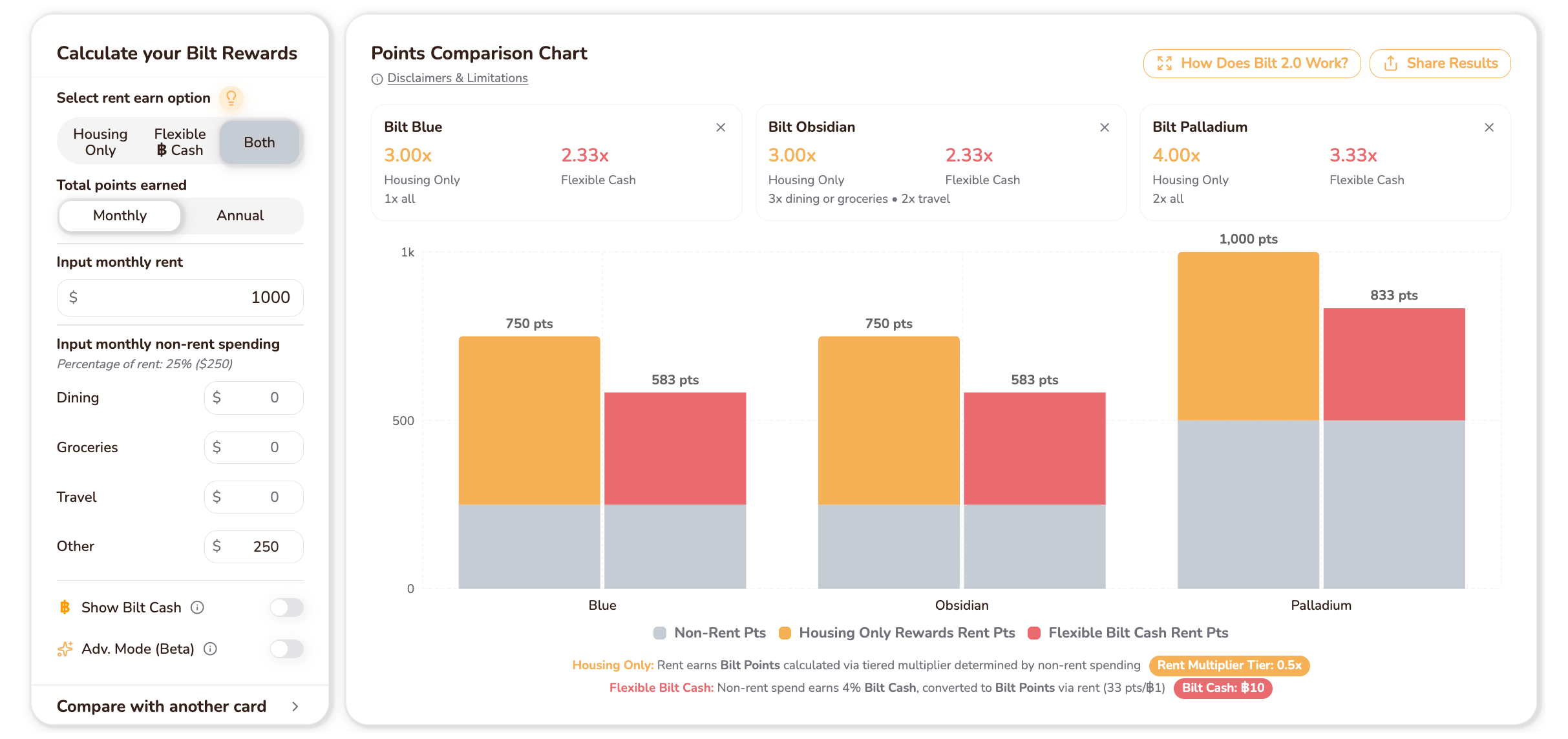
The calculator displays results with visual bar graphs that make card-to-card comparisons simple. You can compare your potential Bilt earnings against the earnings from other cards you already own or ones you're eyeing. This multi-card comparison shows whether the Bilt cards actually makes sense for you.
We built the calculator to reflect how Bilt Cash redemptions actually work, including the different values you get depending on the redemption method. The calculator accounts for Bilt's tiered ‘Housing Rewards Only’ (Option 1) and ‘Flexible Bilt Cash’ (Option 2) rewards structure, and shows real projected outcomes.
The MaxMilesPoints calculator shows results through text and number fields. You'll see a breakdown of point totals, but the tool doesn't include visual charts or graphs to help you compare outcomes quickly. The layout requires scrolling to access different parts of the calculator, so you can't review all your options on screen at once.
Our Bilt 2.0 Calculator uses color-coded bar graphs that display the Housing Only option, the Flexible Bilt Cash option, or both earning structures side by side. The entire interface fits on your screen without scrolling, so you can view all three Bilt cards and their projected earnings in one place. The bar graphs let you compare results at a glance. If you're weighing different cards, the visual difference shows up right away. You can see which card and rent points option earns more rewardsh without hunting through separate result screens.
The MaxMilesPoints calculator limits you to viewing potential earnings from one Bilt card at a time. If you want to compare multiple cards, you need to run the calculator repeatedly and mentally track the differences. There's no way to see multiple Bilt cards side by side in a single results view.
Our Bilt 2.0 Calculator lets you compare all three cards at once. The bar graph displays projected earnings for each card next to each other, so you can see which one delivers the most value for your spending patterns.
We also built in a feature that compares Bilt cards against non-Bilt credit cards you already own or are considering. This helps you answer whether switching to a Bilt card strategy actually beats your current setup or if you're better off sticking with what you have. The MaxMilesPoints calculator does not have this functionality.
The MaxMilesPoints calculator doesn't factor excess Bilt Cash in its math. For example, if your rent is $1,000, you can only redeem $30 of Bilt Cash per month against your housing payment every month. This is a significant limitation because any “excess” Bilt Cash needs to find a home elsewhere; otherwise, it’s not worth anything.
The tool also assumes you already know how Bilt 2.0 works. There's no explanation of ‘Housing Only’ Option 1 versus ‘Flexible Bilt Cash’ Option 2, no breakdown of conversion ratios, and no guidance on redemption methods.
That said, this MaxMilesPoints calculator does not have any way to account for any of the Bilt Cash redemptions. Remember: you can use Bilt Cash for Lyft, Grubhub, dining, hotel stays, etc; none of that is captured in this calculator.
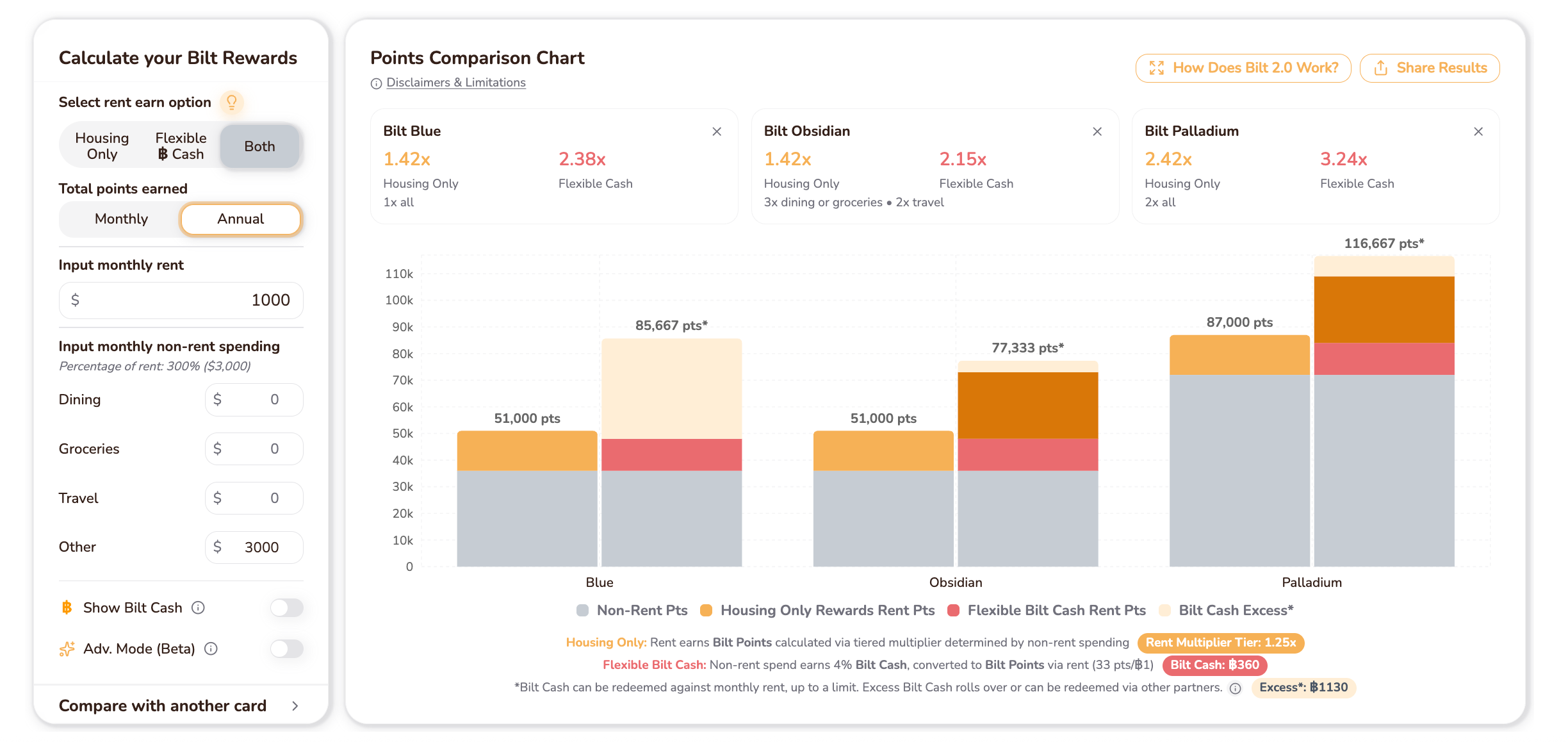
Our Bilt 2.0 Calculator tracks excess Bilt Cash in the graph, so you see your full projected earnings no matter what your rent payment is. The conversion ratio ($3 Bilt Cash = 100 Bilt Points when applied to rent or mortgages) appears within the tool. We also include written and visual explanations of both earning options, with real examples that account for different spending scenarios. If you're still figuring out the Bilt’s new rewards structure, the educational content helps you understand what the numbers mean.
You can also use the nextcard Bilt Calculator’s advanced mode to figure out exact use cases for the Bilt Cash credit redemptions.
Additionally, you can share your custom results from nextcard at anytime. The URL stores all your unique inputs, which makes it very easy to send your results.
MaxMilesPoints works fine for basic calculations if you're comfortable with text-heavy interfaces and want to evaluate a single Bilt card quickly. Additionally, it factors in the welcome bonus to determine first year value calculations (something nextcard’s calculator does not do).
nextcard is the better choice for most people because it pairs visual clarity with complete, accurate information. The bar graph interface turns complex comparisons into something you can actually understand at a glance. Multi-card comparison and Bilt Cash accounting give you the full picture of your rewards earnings, while written explanations next to the calculator add context that helps you feel confident about your decisions.
When you're evaluating the new Bilt cards or figuring out how Bilt Cash changes your card strategy, nextcard delivers a clearer experience that actually saves you time. You can see all your potential earnings across the three cards at once, compare against cards you already own, and know which card fits your spending without second-guessing yourself.
When you're trying to figure out which Bilt card fits your lifestyle, having the right calculator matters. nextcard's tool lets you compare all three Bilt cards in a single view with visual graphs that show exactly where your rewards come from. You can track Bilt Cash properly, see how the cards stack up against your current setup, and get written explanations that help the numbers make sense without feeling lost in the details.
If you want to compare multiple Bilt cards and non-Bilt cards side by side with visual graphs, nextcard gives you the clearest view. MaxMilesPoints works if you only need to check one card's numbers quickly and don't mind a text-heavy interface.
However, be wary that MaxMilesPoints’ calculator does have outdated information and limitations. There is no transaction fee and there’s no handling for excess Bilt Cash.
nextcard uses color-coded bar graphs that show all three Bilt cards at once without scrolling, making comparisons instant. MaxMilesPoints shows text and number breakdowns that require you to run separate calculations for each card you want to compare.
nextcard fits anyone evaluating multiple cards or comparing Bilt card options against non-Bilt cards they already own. If you want to also figure out how to use your Bilt Cash on credits like GoPuff or Home Away From Home, the nextcard calculator is the only calculator out there with this capability.
The MaxMilesPoints calculator is best if you want to quickly see estimated first year value of your card.
No. If you earn more Bilt Cash than your rent payment, MaxMilesPoints incorrectly assumes you can fully use that Bilt Cash. nextcard tracks all excess Bilt Cash in the graph so you see your complete projected earnings.
Yes, but only with nextcard's calculator. You can compare your potential Bilt earnings against other cards you own or are considering to see if switching makes sense for your spending patterns.
TLDR:
nextcard's Bilt 2.0 Calculator shows all three Bilt cards side by side with bar graphs & you can remove them from the comparison view
You can compare Bilt cards against non-Bilt cards you own in one view
The tool tracks excess Bilt Cash and includes conversion ratio explanations
MaxMilesPoints calculator shows one card at a time without visual comparisons
nextcard is a credit card assistant with tools to maximize rewards and benefits
MaxMilesPoints is a points and miles blog & social media channel covering credit card news, reviews, and travel rewards strategies. The site publishes articles about maximizing credit card benefits and occasionally creates tools to help readers evaluate specific card offers.
Their Bilt calculator helps users estimate potential rewards earnings with the Bilt card lineup. You can input your monthly rent or mortgage payment along with other monthly spending, and the tool calculates how many Bilt points and Bilt Cash you might earn over time. The calculator runs in your browser and gives you a breakdown of projected rewards based on the spending amounts you enter.
The interface is functional but basic. You'll see input fields for different spending categories and get a results screen showing your estimated point totals. It does what it sets out to do, giving you a rough sense of what your potential Bilt rewards might look like. The calculator has limitations when it comes to comparing your results against other cards on the market. Furthermore, visualizing the comparisons is difficult and it can be a lot to take from the start.
The big problem: it’s outdated and doesn’t accurately reflect Bilt Cash redemptions. There is no longer any transaction fee when paying your housing payment, but the MaxMilesPoints calculator erroneously shows this.
nextcard is a personalized credit card assistant that helps you find the right credit cards, track benefits, and maximize your existing rewards. We build interactive tools and visual maps that give you straightforward answers about your credit cards without the research headache.
Our Bilt 2.0 Calculator is one of those tools. It breaks down the new Bilt card lineup, changes to the revamped Bilt Rewards Program, and shows exactly how many points and Bilt Cash you'd earn based on your estimated spending. Input your monthly rent or mortgage payment, groceries, dining, travel, and miscellaneous categories to see projected rewards over time.
The calculator displays results with visual bar graphs that make card-to-card comparisons simple. You can compare your potential Bilt earnings against the earnings from other cards you already own or ones you're eyeing. This multi-card comparison shows whether the Bilt cards actually makes sense for you.
We built the calculator to reflect how Bilt Cash redemptions actually work, including the different values you get depending on the redemption method. The calculator accounts for Bilt's tiered ‘Housing Rewards Only’ (Option 1) and ‘Flexible Bilt Cash’ (Option 2) rewards structure, and shows real projected outcomes.
The MaxMilesPoints calculator shows results through text and number fields. You'll see a breakdown of point totals, but the tool doesn't include visual charts or graphs to help you compare outcomes quickly. The layout requires scrolling to access different parts of the calculator, so you can't review all your options on screen at once.
Our Bilt 2.0 Calculator uses color-coded bar graphs that display the Housing Only option, the Flexible Bilt Cash option, or both earning structures side by side. The entire interface fits on your screen without scrolling, so you can view all three Bilt cards and their projected earnings in one place. The bar graphs let you compare results at a glance. If you're weighing different cards, the visual difference shows up right away. You can see which card and rent points option earns more rewardsh without hunting through separate result screens.
The MaxMilesPoints calculator limits you to viewing potential earnings from one Bilt card at a time. If you want to compare multiple cards, you need to run the calculator repeatedly and mentally track the differences. There's no way to see multiple Bilt cards side by side in a single results view.
Our Bilt 2.0 Calculator lets you compare all three cards at once. The bar graph displays projected earnings for each card next to each other, so you can see which one delivers the most value for your spending patterns.
We also built in a feature that compares Bilt cards against non-Bilt credit cards you already own or are considering. This helps you answer whether switching to a Bilt card strategy actually beats your current setup or if you're better off sticking with what you have. The MaxMilesPoints calculator does not have this functionality.
The MaxMilesPoints calculator doesn't factor excess Bilt Cash in its math. For example, if your rent is $1,000, you can only redeem $30 of Bilt Cash per month against your housing payment every month. This is a significant limitation because any “excess” Bilt Cash needs to find a home elsewhere; otherwise, it’s not worth anything.
The tool also assumes you already know how Bilt 2.0 works. There's no explanation of ‘Housing Only’ Option 1 versus ‘Flexible Bilt Cash’ Option 2, no breakdown of conversion ratios, and no guidance on redemption methods.
That said, this MaxMilesPoints calculator does not have any way to account for any of the Bilt Cash redemptions. Remember: you can use Bilt Cash for Lyft, Grubhub, dining, hotel stays, etc; none of that is captured in this calculator.
Our Bilt 2.0 Calculator tracks excess Bilt Cash in the graph, so you see your full projected earnings no matter what your rent payment is. The conversion ratio ($3 Bilt Cash = 100 Bilt Points when applied to rent or mortgages) appears within the tool. We also include written and visual explanations of both earning options, with real examples that account for different spending scenarios. If you're still figuring out the Bilt’s new rewards structure, the educational content helps you understand what the numbers mean.
You can also use the nextcard Bilt Calculator’s advanced mode to figure out exact use cases for the Bilt Cash credit redemptions.
Additionally, you can share your custom results from nextcard at anytime. The URL stores all your unique inputs, which makes it very easy to send your results.
MaxMilesPoints works fine for basic calculations if you're comfortable with text-heavy interfaces and want to evaluate a single Bilt card quickly. Additionally, it factors in the welcome bonus to determine first year value calculations (something nextcard’s calculator does not do).
nextcard is the better choice for most people because it pairs visual clarity with complete, accurate information. The bar graph interface turns complex comparisons into something you can actually understand at a glance. Multi-card comparison and Bilt Cash accounting give you the full picture of your rewards earnings, while written explanations next to the calculator add context that helps you feel confident about your decisions.
When you're evaluating the new Bilt cards or figuring out how Bilt Cash changes your card strategy, nextcard delivers a clearer experience that actually saves you time. You can see all your potential earnings across the three cards at once, compare against cards you already own, and know which card fits your spending without second-guessing yourself.
When you're trying to figure out which Bilt card fits your lifestyle, having the right calculator matters. nextcard's tool lets you compare all three Bilt cards in a single view with visual graphs that show exactly where your rewards come from. You can track Bilt Cash properly, see how the cards stack up against your current setup, and get written explanations that help the numbers make sense without feeling lost in the details.
If you want to compare multiple Bilt cards and non-Bilt cards side by side with visual graphs, nextcard gives you the clearest view. MaxMilesPoints works if you only need to check one card's numbers quickly and don't mind a text-heavy interface.
However, be wary that MaxMilesPoints’ calculator does have outdated information and limitations. There is no transaction fee and there’s no handling for excess Bilt Cash.
nextcard uses color-coded bar graphs that show all three Bilt cards at once without scrolling, making comparisons instant. MaxMilesPoints shows text and number breakdowns that require you to run separate calculations for each card you want to compare.
nextcard fits anyone evaluating multiple cards or comparing Bilt card options against non-Bilt cards they already own. If you want to also figure out how to use your Bilt Cash on credits like GoPuff or Home Away From Home, the nextcard calculator is the only calculator out there with this capability.
The MaxMilesPoints calculator is best if you want to quickly see estimated first year value of your card.
No. If you earn more Bilt Cash than your rent payment, MaxMilesPoints incorrectly assumes you can fully use that Bilt Cash. nextcard tracks all excess Bilt Cash in the graph so you see your complete projected earnings.
Yes, but only with nextcard's calculator. You can compare your potential Bilt earnings against other cards you own or are considering to see if switching makes sense for your spending patterns.